
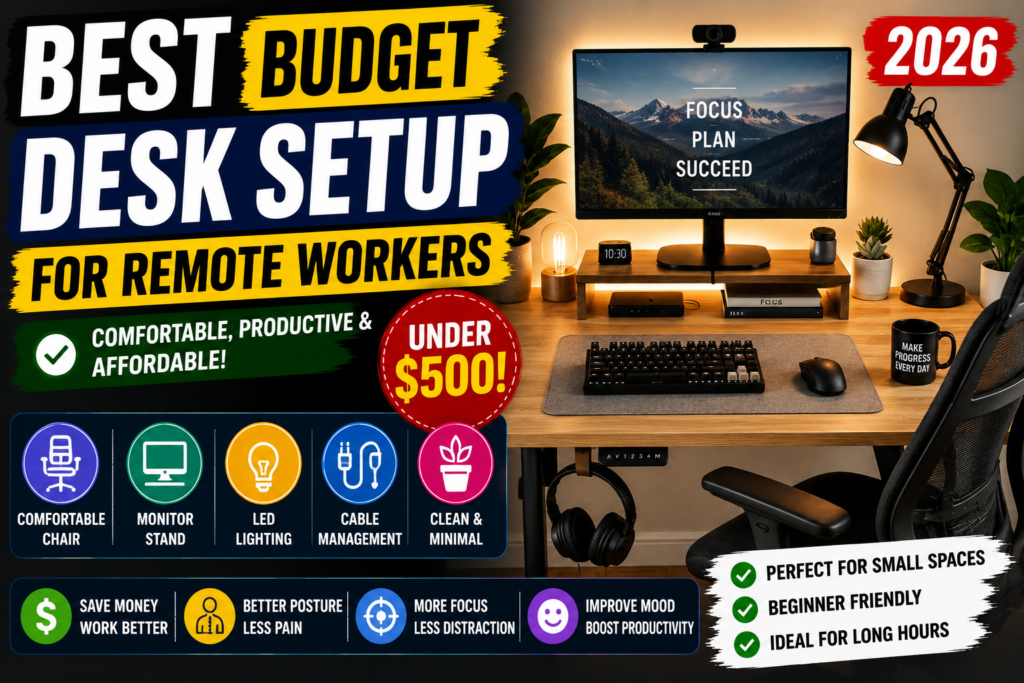

Working from home sounds comfortable until your back starts hurting from sitting at the wrong table all day.
A lot of people start remote work using:
- dining chairs
- beds
- random tables
- uncomfortable setups
At first it feels okay.
After a few weeks, not so much.
The good news is that you don’t need an expensive office to create a productive workspace.
Even with a small budget, you can build a clean and comfortable desk setup that helps you focus better while working from home.
Here are some of the best budget desk setup ideas for remote workers in 2026.
1. Start With a Simple Desk
You don’t need a massive gaming desk.
A clean minimalist desk works perfectly for most remote workers.
Popular affordable options:
- folding desks
- compact wooden desks
- wall-mounted desks
- adjustable desks
Small desks actually help reduce clutter.
Good desk size for small rooms:
40–48 inches wide.
Budget range:
$60–$150.
2. Invest in a Comfortable Chair
This is probably the most important part of your setup.
A cheap uncomfortable chair can ruin your posture fast.
You don’t need a luxury office chair, but look for:
- lumbar support
- adjustable height
- padded seat
- breathable back support
Many people regret spending money on gadgets instead of buying a better chair first.
Budget:
$80–$200.
3. Use a Monitor Stand
A monitor placed too low can cause neck pain.
Monitor stands help lift the screen to eye level and also create extra desk storage underneath.
Some people even use:
- wooden risers
- stacked books
- shelf organizers
Simple change, big difference.
Budget:
$20–$50.
4. Add LED Lighting
Good lighting makes your workspace feel more motivating.
Warm LED lights are especially popular in remote work setups now.
Popular choices:
- LED light strips
- desk lamps
- monitor backlights
A cozy setup can actually improve focus and mood during long work hours.
Budget:
$15–$60.
5. Keep Cable Management Clean
Messy cables make a workspace look stressful.
Simple cable organizers help your setup feel cleaner instantly.
Helpful items:
- cable clips
- under-desk trays
- Velcro ties
- wireless chargers
This is one of the cheapest upgrades that makes a setup look more professional.
Budget:
$10–$30.
6. Use a Mechanical Keyboard (Optional)
A lot of remote workers now prefer mechanical keyboards because they feel smoother and more comfortable for typing.
Not necessary, but many people enjoy:
- better typing feel
- quieter work sessions
- improved productivity
Budget-friendly keyboards are much better now compared to a few years ago.
Budget:
$30–$80.
7. Add Small Plants
Plants make workspaces feel less boring.
Even one small plant can improve the overall atmosphere of your desk.
Easy desk plants:
- snake plant
- pothos
- cactus
- succulents
They also make Zoom backgrounds look nicer.
Budget:
$5–$25.
8. Use a Laptop Stand
If you work on a laptop all day, this helps a lot.
Laptop stands improve:
- posture
- airflow
- desk organization
Many remote workers combine a laptop stand with:
- wireless keyboard
- external mouse
for a more comfortable setup.
Budget:
$20–$50.
9. Noise-Canceling Headphones Help More Than You Think
Working from home isn’t always quiet.
Neighbors, traffic, TV sounds, or family noise can become distracting.
Good headphones help improve concentration, especially during:
- meetings
- editing work
- writing
- studying
Budget:
$40–$120.
10. Keep the Setup Minimal
One mistake many people make is overcrowding their desk.
Too many gadgets can actually reduce focus.
A clean setup usually feels:
- calmer
- more productive
- easier to maintain
Minimal setups are trending for a reason.
Simple Budget Desk Setup Example
Here’s a realistic beginner setup under $500:
| Item | Estimated Cost |
|---|---|
| Desk | $120 |
| Chair | $180 |
| LED Lighting | $40 |
| Laptop Stand | $30 |
| Cable Management | $20 |
| Plant & Decor | $30 |
| Keyboard & Mouse | $80 |
Total: Around $500
Best Colors for a Calm Workspace
A lot of remote workers now prefer:
- white
- beige
- black
- wood tones
- soft green
Bright neon setups look cool online, but neutral colors usually feel better for long work sessions.
You don’t need a luxury office setup to work comfortably from home.
The best desk setups are usually:
- simple
- organized
- comfortable
- practical
Small improvements can make remote work much easier and less stressful.
A setup that helps you focus is always more valuable than one that only looks expensive.